Sunday, January 19, 2025

Nay Saga Devlog 3: Digital Prototype Hints & VS CPU

I'm back with more updates about Nay Saga, my (digital) card game! It'll be physical in the end, but this time I made a lot more progress on the digital version.

So I started out by actually thinking more about the digital version. At first it was just an idea to prototype and test by myself... but I wanted it to become something more. I started to brainstorm story ideas and ways to make this into an actual game so more people could experience it beyond those who have the physical version. I came up with this idea that because it involves all (or at least a lot) of characters from The Nays, I want it to be kind of a summary/look back on the story. So I'm thinking it'll involve Jibu, Mr Dude, and (maybe) Mahllory (or Gojo/Ralphie?) as the three main characters. Each of them can have a different card playing style and they'll walk the player through different aspects of the bigger The Nays story. Through this, they'll unlock cards in chronological order based on when characters first appear in the story. I really liked the idea of connecting this all together better.

So I decided to sketch out some of the digital menus. Super basic wireframes, just to think about how the player would walk through the menus. I want there to be a story mode with the ideas discussed above, and then also a free play where everything's already unlocked and you can just play the card game. This mode might even have a PVP mode if I can figure out a good method for it. I know I can make it kind of work with the first mode I'm working on, but with the ones that have hands, I may just not have that be an option for those.


I finally decided to work on the AI CPU so I could actually start testing this game out. And this ended up being a long journey for me. A week of intensive programming that was ahead of me. I started out with another p5 project to figure out the basics of how the CPU would generate hints, based on the character cards in the hand. I started with a lot of arrays... and the whole thing ended up being mostly arrays, honestly.

I had the basics down for how to store the data in arrays, but it was pretty new to me for figuring out how to find the most frequently used data that I could pull out and reference and sort through. I spent a lot of time on Stack Overflow and W3 Schools trying to actually learn how arrays work more. It was pretty difficult and some of the code I still don't have a full grasp of how it's working, but I got it all to work in the end! This article on Medium was super helpful for understanding a lot of it. I didn't have everything 100% working in p5, but it was close enough that I figured I would finish it up in RPG Maker.

So I transitioned back to RPG Maker. I started by storing all of my arrays in variables and actually wrote the RPG Maker script in p5 first before I added it, because it was a lot of code. Once I defined all of those variables, I moved on to the main code.

I realized I had to copy a lot of variable data and push it back and forth to make them globally available, as I was making the scripts. I imported the functions with the arrays pretty much exactly and they worked as they did in p5. So it cycles through and finds the most frequently used value, and which location it's in, within the array.

From there, I basically converted most of the end parts of the code to RPG Maker events. It was a lot of if statements and looping around all of the data, so that was a lot easier to accomplish in RPG Maker. I made use of labels to loop it back and conditional branches to check for each value.

Then I created the code to determine which hint to give, based on if the most frequent trait matched any of the random character's. If it doesn't, it loops back to the start and does it all over again. So I finally had a way to loop it back if it didn't find a match, but I realized that I needed a way to remove the most frequent element so it wouldn't just pop up again. I ended up creating a for loop that basically iterates through and removes every instance of that trait (turning it into "0"), so I can have it ignore that trait when it goes back through. This worked out really well and I got it up and running!

Everything was working! I had a lot easier of a time creating this in RPG Maker than I did when I was just confined to p5. Though I will say, this is definitely the longest RPG Maker script I've ever created. I had considered turning it into a plugin even, but that seemed more complicated than it was worth, so I just put comments around my large script event.

I also was printing to the console quite a bit while I was debugging. This was a lot faster than going into the F9 variable manager in RPG Maker to check every time something changed. It also gave me more real-time feedback on what was happening at what moment.

So then I started to work on the playability of the project, since it was all functional. I made a total of up to 3 hints show up, and it iterates through and keeps choosing them. They pin to the screen and show different information based on the variables. I also figured out how to add icons to them so they can more directly relate to the cards and make it easier for the player to decipher the hints. And then I also updated some of the placements and look overall, to organize all of the information a bit better. I updated the correct/incorrect positions and effects as well.

So this was a huge programming journey for me this time! I know this was very light on the actual visuals, but I accomplished a lot and I'm so happy that it's playable and I can actually fully test it by myself! There are still some things I want to do to improve it, but the bare bones are there and I've been testing it out. It's been fun so far, so that's what's important!

Sunday, January 12, 2025

Nay Saga Devlog 2: Video Game Prototype & Card Generator

I've been working on my card game, Nay Saga, more. Even though I know this was meant to be a physical game... well, I decided to create some digital programs as well to help with development!

I decided it would be easier to prototype and test by myself if I made a digital video game version. So I started with one of the versions of the game rules where you draw 8 cards and have to guess a character from the group after asking questions about the characters. I was able to get a basic version of this up and running in one day!

To start out, I wrote some basic JavaScript to prototype and test it faster, then I converted it all into RPG Maker.

I wrote a for loop to draw each card, then a do while loop to make sure the cards are random and no two cards are ever in the same set. After that, it pushes the random card into an array until there are 8 of them.

I stored some information like their Types and Traits in Classes/Armor/Skills in the RPG Maker Database so I could reference them at any time as well. Then I set up the clickable pictures with some basic prototype pictures and plugins. I got it functional where it'll give you points based on how fast you guess the character.

Then I started to think about how I plan to create hundreds of cards... and of how that PSD file would be huge to manage. So I decided I should make a program to help automate some of this! I started by creating a p5 JavaScript project to show the picture elements and then with the click of a button, compile it all, and save it as a PNG. This was a way for me to auto-generate cards. It worked pretty much how I wanted.

My next task was to figure out how to import the data. While this is a faster method than using Photoshop to type elements in, I'd still have to type data for hundreds of cards and click the button and save them out individually. I tried to import data from my spreadsheet with the information, but due to some preloading complexities with image files in p5, I wasn't able to figure out how to actually make this work.

I decided to move on to RPG Maker to see if I could solve it there. I've never saved images out of RPG Maker before, so I went on a hunt to find plugins that may do what I need. Unfortunately nothing existed that was exactly what I wanted. I found the KC_CompositeBitmaps plugin which saves out composited image files, but you can't choose the X/Y positioning of them or export text. I was also directed to the OrangeMapshotMZ plugin which can save out tileset maps but not pictures. I spent some time trying to interpret the code and see if I could combine them and update them for what I needed. I've never written an RPG Maker plugin before though, so I wasn't able to figure out how to achieve it.

So I ended up deciding to go with the Composite Bitmaps plugin for the time being. I made a workaround that would allow it to work for all of the elements aside from the character name text at the top, so I thought that I may just use a combination of importing the final card into Photoshop (or p5) if I have to. It'd still save me a lot of time that I would spend lining everything up in Photoshop.

From there, I started to build the code I needed to save out multiple cards with this plugin. I set up variables to pull data (like the Type/Traits) from the RPG Maker Actor Database and plugged those in to save out card elements based on what's in there (named character images, Types, etc.).

Then I created a loop that adds to the Actor ID variable so it'll save out all of the specified cards at once. I've tested it with 2 and it actually worked pretty well! Everything exports with my vision other than the text.

I took a break from the exporting process and came back to the playable game. I created a rough layout for elements I wanted to be tracked on screen to help with testing.

From there, I added UI elements like showing how many guesses you've done and your total points. I also added an animation for text to pop up if your guess is correct or incorrect to accompany the sound. Then I animated the chosen card for 30 seconds at the start instead of showing the text. This is still pretty placeholder, but works for now!

And then I started to think about how much additional work adding the text elements would be if I went with my RPG Maker method... so I went on another hunt to find an easier method. I started out with Dextrous. I kind of got some elements working, but I couldn't quite get the quality to match up with my Photoshop files, and had to do a lot of manual movements in the browser. So I decided to move on after a bit of testing.

I thought I might have to go back to my RPG Maker method, so I looked into how I could import my data from Google Sheets to RPG Maker. I found the official Database ConVerter on Steam. I created a bunch of new formulas in my Google Sheets to convert my data into numbers that could be read by RPG Maker.

So then I imported the data in... and had a lot of errors. I posted on forums and did a lot of searching online, but no one could seem to figure out the solution to the problem. It might be Google Sheets-related since I don't have Excel, but I'm not really sure why. It would import the data, but then make my game unplayable and remove the player start permanently from the game.

I did a lot of testing and research, and finally found a weird workaround. If I import the Google Sheets database into a dummy project, then Ctrl+C/Ctrl+V the entire Database over (in RPG Maker) to my actual project, it seems to import correctly. I'm not sure why it corrupts the data otherwise, but this is probably what I'll just have to do for now.

After all of this, I knew I still needed the data in RPG Maker for the digital copy of the game, but I was still determined to find a solution to the issues with exporting out files. I wasn't quite satisfied with how I was doing it in RPG Maker, if it would require me to still bring files into Photoshop and do manual work. There had to be a better way... so I found one. It's called nanDECK.

I was reading a lot of reviews about the software and they said it was a steep learning curve and the UI looked kinda older. I decided to try it out anyway, and it ended up working out to be exactly what I needed! It was a more coding approach and gave me much more control over positions and making edits, while still keeping the quality I wanted and everything. It has a visual built-in editor that you can use for previewing cards as you change code too, which is nice and allows for quick prototyping. I ended up making my entire card layout in there in about a day and it turned out exactly how I wanted!

It took a little getting used to, but I really like how it works. And I really prefer it being a software rather than browser-based. I will admit that the documentation is a little rough to get through, and even though the community is fairly small, they seem very dedicated. I was having an issue getting the first name and last name to position next to each other properly on the card, so I joined the Discord server and asked about it. Within a few hours, someone helped me out a ton and we got it all working!

So overall I'm making a lot of good progress! I almost split this into two posts, but it all felt relevant enough to keep in one. I'm glad I was able to get some automation working for the card generator. Even though it took me awhile to figure out the right approach, it'll automate so much and save me a lot of time in the end when I'm iterating and making a lot of big changes.

Sunday, January 5, 2025

Nay Saga Devlog 1: Planning & Concept Card Layouts

I'm back with another devlog series for my 2024 project: Nay Saga! It's a card game that I decided to create as my year-long project. Similar to my 2023 project, The Nays Origins, I'm writing these blog posts over a year ago but posting them now to showcase my process of the project. I'll be posting these every week to talk through the whole production. These will also be from the perspective of the time, so sometimes I'll talk about ideas and directions I'm going, but that may not reflect the final version of the game (as these are scheduled and not updated after writing them initially).

I have a massive document with all of my game ideas and it was actually in November 2023 that I was browsing through it and remembered my idea for a physical board/card game. I was talking about the idea with my roommate and I had a burst of motivation to make it for my 2024 project.

I brainstormed ideas for how the game would play and I had a few different ideas for how it could go. I figured I would test all of them after I had some paper prototypes and see which one was most fun and made most sense. My idea is to potentially include all of them as variations in the rule book so players can kind of choose which way to play it, or it'll be a series of rounds where each round plays differently. We'll find out!

Right now my idea is that it'll be a card game that involves statistics about a bunch of characters in The Nays. Back in 2014 I started this project called Nay-A-Day where I would draw a character from The Nays every day on their birthday. I continued it for awhile so actually ended up drawing a lot of the main characters and even some background ones through it. 

Back in 2019 I had this idea for a game called "NAD Saga" where it would be about all of the more background characters that I drew and I would use those drawings for it. It didn't really go anywhere, but it kind of inspired this. I decided that I wanted to use those drawings as the art for the cards! I probably won't have all 1037+ characters in this game, but I could have a lot of them and it could be something I could keep on adding to as I draw more of these!

So this inspired me to draw more of these Nay-A-Day drawings so I could have some more updated art. I just continued where I left off and, though they took a lot longer to draw, it was a great way to make new art for this card game!

Then I gathered my inspirations of card designs that I like. I knew I wanted to have some kind of statistics to really tie into the characters' personalities. So I was taking a look at how many different stats are typically displayed on cards in the games that I enjoyed playing. I deduced it's generally 4 at maximum on average (outside of the name of the card and the drawing of the character). So I decided to make 1 type (which determines the color) and then 6 "traits" that differ from character to character. By making them all just 1 category of traits, it makes it easier to keep track of and technically means I only really have 2 aspects (just a bunch of different trait icons that could match up).

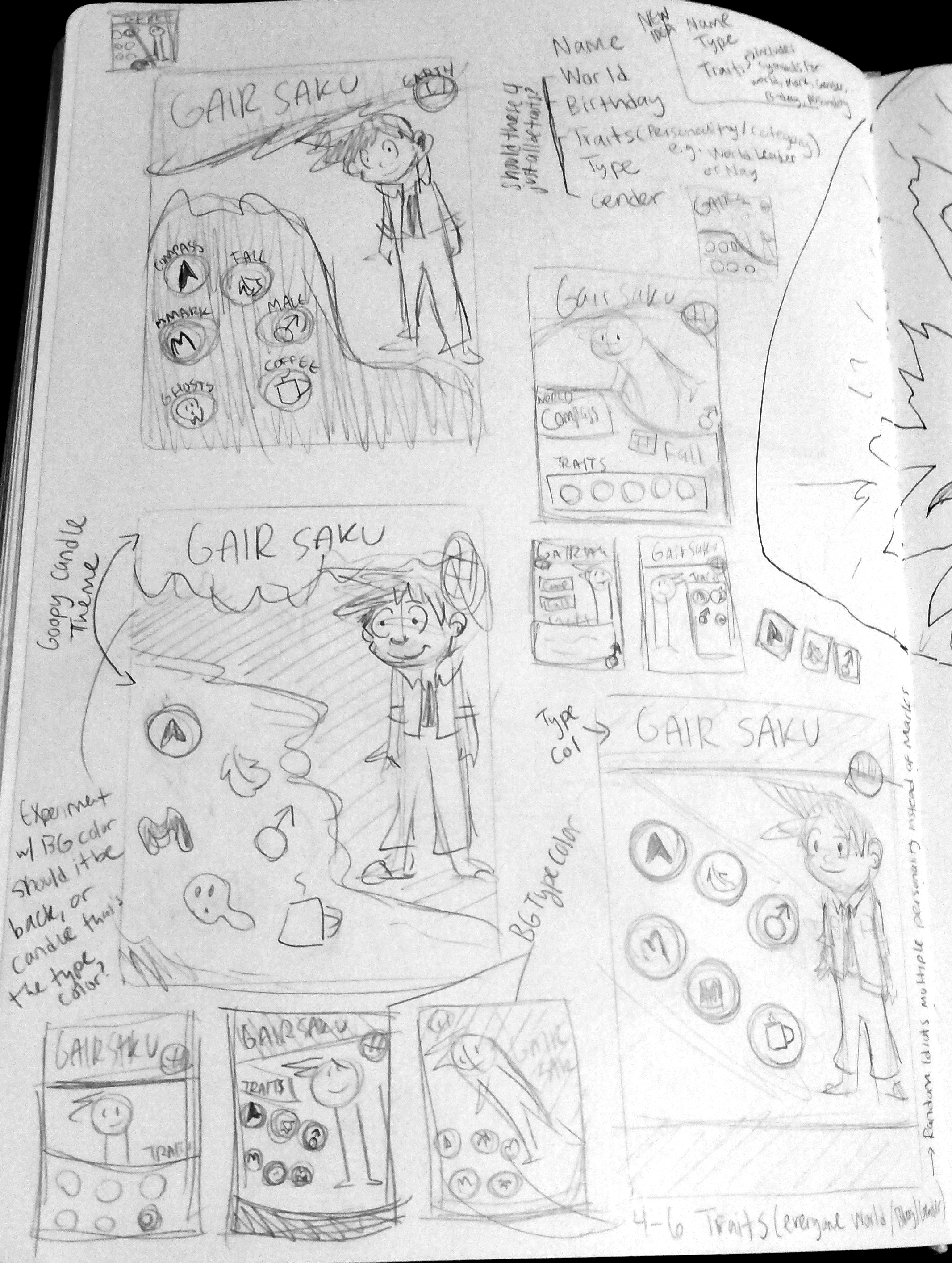
So then I started to concept some ideas in my sketchbook. I started out really rough. Tiny thumbnails to get my ideas out there. I love starting this way because it means I can quickly iterate and don't spent a lot of time on them. It really helps me get my ideas out there.

I decided to trace some bicycle cards to get the actual size and dimensions of the cards so I could prototype a little bigger but still rough. I was starting to like the layout of having the traits as icons and the type being the color scheme.

Then I decided to go onto TheGameCrafter website to research the exact templates. I downloaded the Poker cards because those seemed like the most standard cards and were biggest of the three options. So I brought it into Photoshop and started to concept some ideas.

I started with one of my more recent NAD characters and arranged some elements similar to the concepts I liked from my sketchbook. I started to realize that this looked pretty good with this character, but might be awkward with more square-shaped proportioned drawings.

I took a few characters of different sizes that I had already drawn to try and find a layout that could fit for all different sizes. I moved some elements around and was starting to get somewhere.


I still wasn't sure how I felt about the characters who are much taller than wide; it just felt like a lot of empty space to me and I wasn't sure if I liked that. So I tried another layout idea that has a higher res version of them from the waist up basically and then a tiny image faded of the full body. That way it could kind of be rearranged however works.

Then I started to put together the spreadsheet so I could figure out which traits I was going to use. I was trying to come up with ones that could be universal enough to be used by multiple characters, but also specific enough to describe the character. It was challenging and I hope I don't have too many options.

I showed the concepts that I did to my friends and they gave me some feedback, like trying to turn the full body versions into more of a background or maybe swap and have the close-up in back. So I started to sketch out some new concepts on paper based on some of the ideas that they gave me.

Then I started to digitize those and come up with new ideas. I was starting to like the idea of having a straight line that all of the traits are in, to keep them organized in one row rather than pairing them up. It felt a lot cleaner to me.

From there, I got more feedback and continued to iterate new designs. I sketched out a few more tiny thumbnails to come up with ideas on how I could maybe slightly curve the line instead of it being straight. I also wanted to pull the type up next to the name since I was having trouble fitting it in other positions in my previous concepts.

So then I made a few more digital concepts based on those. I realized something I liked about my sketchbook concepts was not having a full border around the cards. I played around with that a bit and ended up liking that more.

Right now I'm leaning towards the two above, but still not 100% sold. I'm going to think on it for a bit and see how I'm feeling when I come back to them. I'm happy with the progress I've made and looking forward to coming up with final icon designs and colors!